Life off the grid in the SW Texas desert. An experiment in sustainable living. NUMBERS AT THE END OF EACH BLOG POST: temp at 8PM,high temp,low temp,rainfall,wind conditions(CalmBreezyWindyGusty). YouTube Channel https://www.youtube.com/c/TheFieldLab
Daily live streams at https://www.youtube.com/thefieldlab/live
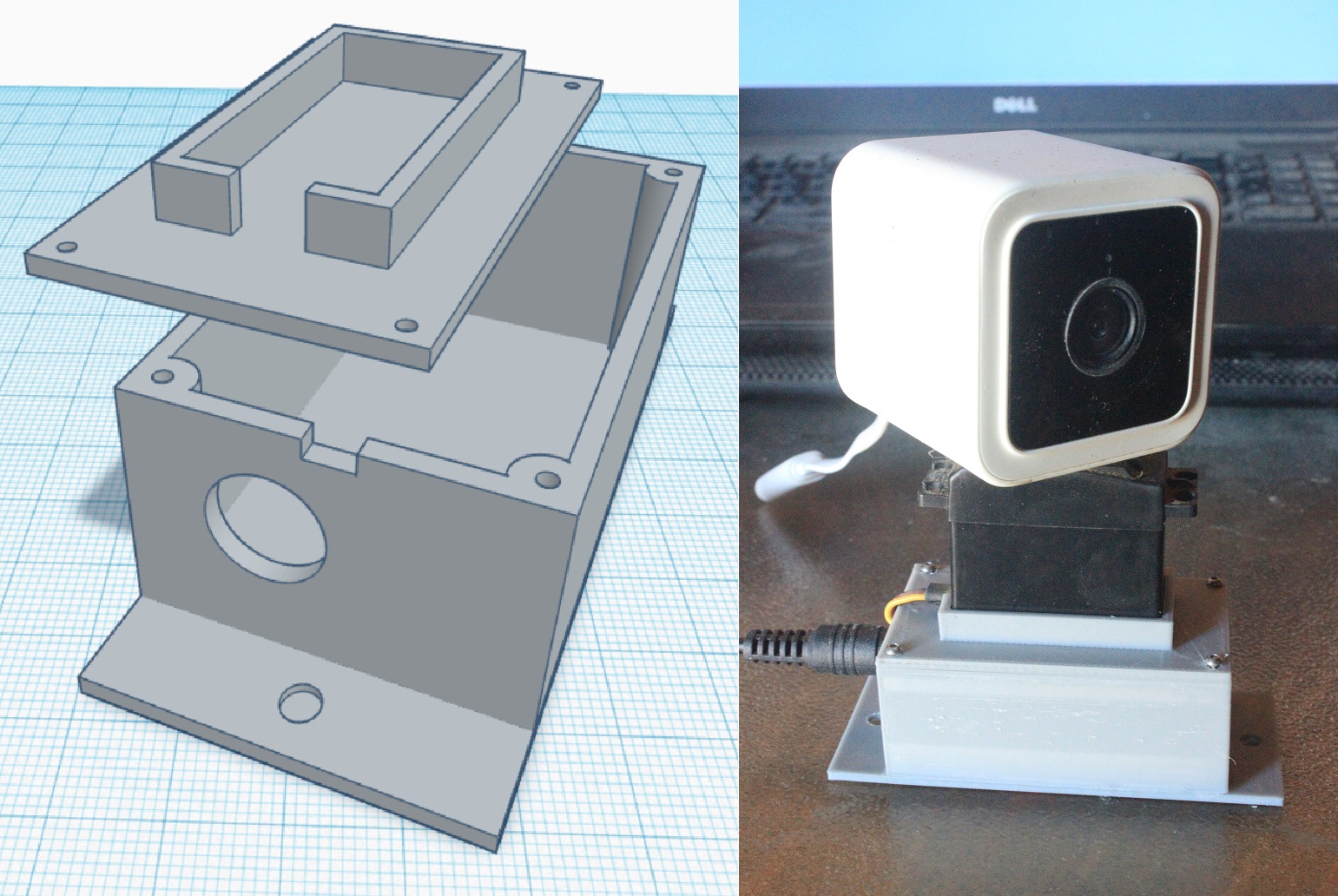
Wanted a quicky project for today. Decided I needed to be able to pan one of my Wyze cameras using a servo motor controlled over wifi and found these down and dirty instructions that worked like a charm. 79,86,56,0,B
Wired in a new external antenna for the Wyze Cam V3 and tripled the Wi-Fi range - from 250 meters to 685 meters. Finally lost signal when my greenhouse was blocking my wi-fi extender at the hut. I will do another test line of sight to see how much further I can get out of it. 87,90,65,0,B
From the video description: Funny thing about this video is that you really can't see anything I'm doing to rig this up until the very end. Sorry about that - but I don't feel like re-shooting it. I added a catchy tune for the soundtrack to keep you viewers entertained. This is for a neighbor that I recently did a solar and Starlink install for. We first rigged up his Wyze Cam V3 running it off a 50' extension cord coming from his battery bank and inverter. I have a Wyze Cam V3 that I installed at the end of my driveway, 230 meters from my house. I added a wifi repeater that bumps the signal out that far but no power out there, so I set up a similar system to power mine. I used a 12V / 10 Ah sealed lead acid battery, a 30-watt solar panel, and a cheap PWM charge controller I had on hand. In testing I found that it was a bit overkill (power wise) for the camera, so I have been experimenting with scaling the system smaller. For the system in the video, I used a 12 V / 5 Ah sealed lead acid battery ($15.99), a 10-watt solar panel ($25.99), and another PWM charge controller ($12.31) that I had to buy. The cheap PWM charge controller is nice in that it already has a USB port to plug the camera directly into (plug'n'play). I mounted the charge controller to the battery using silicone calk, electrical tape, and baling wire - and rigged it within a large, inverted coffee can to make it "water proof". In testing the system, I found that the 5 Ah battery worked fine without being drained too much powering the camera overnight and was fully charged again in about 5 hours of full sunlight with the 10 watt solar panel. We get A LOT of sun out here, so this works just fine for me. A larger system will be required to run the camera for extended periods of cloudy days. Comment below if you have any questions. (NOTE: When connecting up any system like this, ALWAYS connect the battery to the charge controller first - then connect the solar panel to the charge controller. There are no fuses in the systems I installed but it is always a good idea to fuse the positive lines for all components. This is NOT a how to do it perfectly right - this is a HOW I DID IT. PROCEED AT YOUR OWN RISK IF YOU FOLLOW MY INSTRUCTIONS.)
BatterySolar PanelCharge Controller
(You will also need some wire to connect the battery to the charge controller and extra wire if the solar panel is going to be further away from the charge controller.) 99,103,76,0,B
One more test with the Wyze Cam V3 remote setup. I found that the 20-watt panel I used in the last test had the 12 volt 5 amp hour battery fully charged within 2 hours as soon as the sun was up so I checked out how a 10 watt panel works today. Fully charged in 4 hours (which sounds about right) so that works for me. Going to install the new gear for my neighbor's camera tomorrow - and put away that extension cord. 99,102,57,0,B
Another Wyze Cam V3 remote power test coming up - parts arriving tomorrow. Going to install this system for the neighbor up the hill that I did work for. Fairly confident now that I can get away with half the amp hour battery capacity and a slightly smaller solar panel to keep his Wyze Cam chugging along 24-7 without having to be plugged into a long extension cord. 98,104,58,0,B
Test with the new gear to remotely power the Wyze Cam V3 was a success. Now that I know it works for sure, I'm going to permanently install it out at the end of the driveway. Next up, I am going to replace my wanky indoor wifi extender with a better model that is rated for outdoor use. 88,101,71,0,B
The neighbor that I did some work for on his vacation getaway out here lives full time in Houston. He got this alert on his cell phone this morning from the Wyze Cam V3 that I installed. 98,103,56,0,B
So I'm returning the little solar charged power bank for a full refund. I started the test yesterday morning after fully charging the power bank for 8 hours with a 5V adapter plugged into AC power. It barely got any charge off its little panel during the day while the camera was running and only just managed to continue powering the camera overnight. All in all, it lasted 27 hours. For the next test, I ordered a 30 watt panel and a 12 V / 10 Ah SLA battery. If my math is right, this "should" work with some power to spare. I already have one of these cheap PWM charge controllers to hook the system together. It is perfect for this application since it already has a 5V USB outlet to power the camera off a 12 volt system. 87,91,56,0,B
Camera running off a power brick and programmed for a time lapse while connected to the internet - then relocated away from the internet to shoot the sequence. If the camera is set to continuous recording, it will also do that while recording the time lapse at the same time. 87,93,52,0,B
A quick test to make sure I can record motion triggered events and easily transfer them from the Wyze Cam V3 to my computer for editing. To do this go to settings/event recording and turn on "Detect Motion". Then go to Advanced Settings and make sure Continuous is chosen instead of Events Only. Then from the home screen, click on events and choose the event - then choose playback and from that screen you can scroll to the section you want and hit record then stop when finished. Next choose album and you can see the recording you just made. Click on your recording and choose "share" at the bottom of the screen and upload it to Google Drive (you can rename the file before the upload). Then you can download the file from Google Drive to your computer for editing. There seems to be a glitch in the app (at least for me) - when you try to go back to the Album page, it gets stuck on "Loading". From that point you have to restart your phone to get back to the home screen in the app. Doh De Oh by Kevin MacLeod is licensed under a Creative Commons Attribution 4.0 license. https://creativecommons.org/licenses/...
Source: http://incompetech.com/music/royalty-...
Artist: http://incompetech.com/


.jpg)


.jpg)





.jpg)
